Table of contents
Open Table of contents
A slow query can become a repeating incident
Imagine a report query that scans a large table and runs long enough to affect other work in its resource group. An operator cancels it, but the same SQL is sent again by a scheduled job a minute later. Stopping one execution does not prevent the next one.
TiDB’s runaway-query feature gives the operator two choices. A threshold rule can identify a query after its elapsed time, resource-unit (RU) consumption, or processed-key count passes a limit. A watch rule can recognize a matching query quickly on a later execution, before it repeats the expensive work.
The difference matters:
| Mechanism | What it matches | When it acts |
|---|---|---|
QUERY_LIMIT | An execution threshold such as elapsed time, RUs, or processed keys | When the checker observes the threshold being exceeded |
WATCH | Exact SQL text, a normalized SQL digest, or a plan digest | At the start of a later matching statement |
A QUERY_LIMIT can also include a WATCH clause. Then the first execution is detected by its threshold, and TiDB can add that query’s signature to the watch list for the configured duration. Future matches can be acted on immediately.
Two ways to recognize a runaway query
A resource group can carry threshold settings such as EXEC_ELAPSED, PROCESSED_KEYS, and RU. The docs apply EXEC_ELAPSED to read and write DML; PROCESSED_KEYS and RU limits apply to reads. When a configured limit is reached, the ACTION says what TiDB should do:
DRYRUNrecords the event so an operator can tune a rule without changing execution.COOLDOWNlowers the priority of later coprocessor requests for the query.KILLinterrupts the query.SWITCH_GROUPmoves the query to another resource group.
The WATCH selector chooses how later executions are recognized. EXACT uses the SQL text, SIMILAR uses a normalized SQL digest that ignores literal values, and PLAN uses a plan digest. A duration limits how long an automatically generated watch remains active.
For example, this resource group kills statements that run for more than ten seconds and watches their normalized SQL shape for ten minutes:
CREATE RESOURCE GROUP reports
  RU_PER_SEC = 500
  QUERY_LIMIT = (
    EXEC_ELAPSED = '10s',
    ACTION = KILL,
    WATCH = SIMILAR DURATION = '10m'
  );
An operator can also add a watch directly, without waiting for a first threshold violation:
QUERY WATCH ADD RESOURCE GROUP reports
  ACTION KILL
  SQL TEXT SIMILAR TO 'SELECT * FROM orders WHERE customer_id = 42';
With SIMILAR, that SQL is normalized to its digest; a later query with different literal values can match the same pattern. SQL TEXT EXACT keeps the literal text, while PLAN DIGEST lets an operator target a physical plan. If the action is omitted from QUERY WATCH, TiDB uses the action configured for that resource group.
The RU_PER_SEC option in the example is the group’s resource budget. It is separate from QUERY_LIMIT, which decides when an individual statement is considered runaway.
How the code pieces fit together
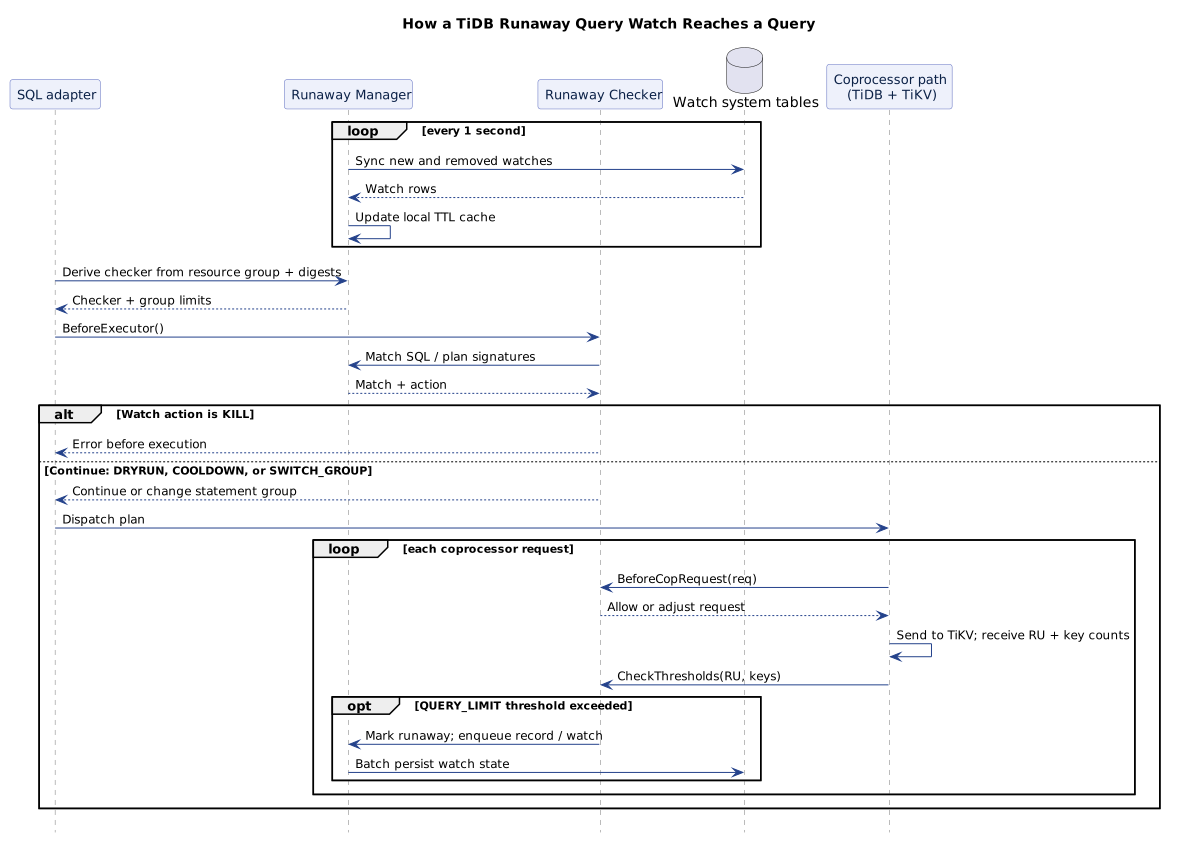
The sequence diagram highlights the fast path. Watch rows are copied into each TiDB server’s local cache, so each query can be checked without reading a system table on the request path.
1. QUERY WATCH turns SQL into a signature
The AddExecutor in pkg/executor/internal/querywatch/query_watch.go converts the SQL options into a QuarantineRecord. For SQL TEXT SIMILAR, it parses the text and stores the normalized SQL digest. For SQL TEXT PLAN, it runs EXPLAIN and stores the resulting plan digest. It validates the resource group and action, then hands the record to the runaway manager.
The manager inserts a manual watch into mysql.tidb_runaway_watch in an internal transaction. That conversion is important because the hot path should compare a short signature, not parse every saved SQL string for every query.
2. The manager keeps a local watch cache
The runaway.Manager owns a TTL cache keyed by resource group plus watch signature. When a watch is added after a threshold violation, the manager can place it in the local cache immediately, then queue the record for persistence. Manually added watches are persisted to TiDB’s mysql.tidb_runaway_watch table. A companion mysql.tidb_runaway_watch_done table carries removals.
The manager starts a background loop that syncs new and removed rows about once per second. Each TiDB instance refreshes its own cache from those tables. A query on one server can therefore make future matching queries fast to reject on another server after that server’s next sync.
There is also a separate history path. The manager batches runaway records into mysql.tidb_runaway_queries; the query execution path only enqueues a record rather than waiting for that history write to finish.
3. The SQL adapter derives a checker for each statement
After TiDB has a plan, pkg/executor/adapter.go gets the statement’s SQL digest and plan digest and calls Manager.DeriveChecker. The manager fetches the resource group’s current QUERY_LIMIT settings from the resource-group controller. If the group has no runaway settings and no active watch, it returns no checker, keeping ordinary statements off this path.
Otherwise, the manager creates a Checker holding the resource group, SQL text, both digests, threshold settings, and the statement start time. The adapter puts that checker into the statement context and calls BeforeExecutor() before it builds the executor.
4. The checker matches and applies the action
Checker.BeforeExecutor() checks three possible signatures against the manager’s local cache: exact SQL text, SQL digest, and plan digest. A KILL match returns an error before execution. A SWITCH_GROUP match returns the target group to the adapter. DRYRUN records the match and continues. COOLDOWN continues too, but the checker lowers the priority on later coprocessor requests.
Threshold checks happen as TiDB exchanges coprocessor requests and responses. The coprocessor worker calls BeforeCopRequest() before sending a request and CheckThresholds() after it receives execution details. The checker accumulates processed keys and compares the returned RU details and elapsed-time deadline against the group’s settings. If the rule is KILL, it returns an interruption error. If a WATCH is configured, the first violation can also place the query’s selected signature into the local watch cache and queue it for other TiDB instances to sync.
This split explains the feature’s name: a threshold identifies a runaway execution, while a watch quarantines its repeated query shape.
The settings that matter
Resource Control must be enabled for TiDB to attach these checkers. For self-managed clusters, check tidb_enable_resource_control on TiDB. TiKV’s resource-control.enabled setting controls request scheduling based on resource-group priorities; it needs to be enabled for COOLDOWN to have its intended scheduling effect. TiDB documentation says both settings are enabled by default starting in TiDB v7.0.0, but verify the settings for the cluster version you operate.
For a first rollout, DRYRUN is a useful action: it records queries that would match while leaving them running. Review the records, choose thresholds that separate expected scans from runaway work, then switch to COOLDOWN or KILL. Give automatic watches a bounded DURATION so a query shape is not quarantined forever by accident.
The match type is a practical choice:
- Use
EXACTwhen one literal SQL statement is the problem. - Use
SIMILARwhen the same SQL template appears with changing parameter values. - Use
PLANwhen only a particular physical plan should be watched.
Inspecting watches and runaway records
Use INFORMATION_SCHEMA.RUNAWAY_WATCHES to see active signatures and their actions. Use mysql.tidb_runaway_queries to review identified statements, the match type, sample SQL, digests, and the reason a threshold was exceeded. Those views help answer whether the rule caught the intended query and whether its watch duration should be changed.
The important design choice is that the persistent tables are control-plane state, while the manager’s local cache is the query fast path. A saved rule can be inspected and synchronized, but each statement is matched in memory before TiDB sends its work to TiKV.
References
- TiDB documentation, Manage Queries That Consume More Resources Than Expected (Runaway Queries).
- TiDB documentation, QUERY WATCH statement.
- TiDB documentation, Resource Control and resource groups.
- PingCAP blog, Enhancing Database Stability in TiDB with Runaway Query Management.
- TiDB source at commit
c3adc8d: QUERY WATCH executor, watch persistence, SQL adapter, runaway checker, runaway manager, watch sync loop and cache updates, watch table scans, watch synchronization interval, coprocessor request hook, and threshold check after a response. - TiDB design note, Runaway Queries Management.