Table of contents
Open Table of contents
What is Envoy Proxy?

Envoy is an open-source, high-performance L4/L7 network proxy originally built at Lyft. It sits in the data path between services or external clients, purposefully designed to make the network transparent to cloud-native applications.
It handles:
- Service discovery and load balancing: Routes traffic to healthy backends.
- L7 protocol awareness: Understands HTTP/1.1, HTTP/2, gRPC, and filtering for protocols like MySQL, Postgres, and Redis.
- Deep observability: Emits detailed stats, distributed tracing, and structured access logs out of the box.
- Resilience patterns: Applies rate limiting, retries, timeouts, and circuit breaking natively at the proxy layer.
North-South vs. East-West Traffic
To understand how Envoy is deployed, you first have to understand the two primary patterns of network traffic in modern infrastructure:
North-South Traffic
Traffic that crosses the boundary between external clients (e.g., the Internet) and your internal network.
- Examples: A mobile app calling an API (
api.example.com), a browser loading a web page, or your service calling a 3rd party webhook. - Handled By: Edge Proxies, API Gateways, or Cloud Load Balancers (like AWS ALB).
East-West Traffic
Traffic that stays entirely within your cluster—service-to-service communication.
- Examples: An Order Service calling a Payment Service, or a web worker querying a local Database.
- Handled By: In a microservices architecture, east-west traffic often vastly exceeds north-south traffic. This is where the Sidecar pattern thrives.
Deployment Modes
Envoy is incredibly versatile and typically deployed into these main roles:
1. Front Proxy (Edge Proxy)
In this mode, Envoy acts as an API gateway sitting at the edge, replacing traditional load balancers like Nginx to handle inbound north-south traffic.
Even if your cluster uses sidecars internally, you still need an entry point for external traffic to enter the network. An Edge Envoy handles TLS termination, rate limiting, and routes external traffic to the correct internal service.
2. Sidecar Proxy (Service Mesh)
Traditionally, east-west traffic funneled through a centralized internal Load Balancer. This created a single point of failure, added extra network hops, lack of per-service observability, and created an internal scaling bottleneck.
Envoy solves this using the “sidecar” pattern—distributing load balancing to every single service instance.
In a sidecar setup, Envoy runs in a separate container directly alongside your application container.
- Ratio: There is exactly 1 Envoy sidecar for every 1 service container (e.g., 500 Order Service pods = 500 Envoy sidecars).
- Client interaction: The application simply talks to
localhost. Envoy intercepts the traffic, executes routing/security policies, and sends it directly to the destination service’s proxy. There is no central chokepoint, and the proxy layer scales perfectly with your services.
3. Putting It Together: Production Architecture
Does using deploying a sidecar mesh mean you no longer need load balancers entirely? No. You still need an entry point for your cluster.
| Layer | What Handles It |
|---|---|
| Edge / North-South ingress | Cloud LB (ALB/NLB), Envoy as ingress gateway, or API gateway |
| East-West / service-to-service | Envoy sidecars (no central LB needed) |
What the sidecar mesh eliminates:
- Internal LBs between every pair of services.
- Central east-west load balancers that all internal traffic funnels through.
- Hardware LBs for service-to-service traffic.
What you still need:
- Something at the edge to accept external traffic (cloud LB, Envoy gateway, etc.).
- DNS resolution for external clients to reach your cluster.
A common production architecture looks like this:
Internet
   │
   ▼
[Cloud LB / NLB]          ← North-south entry point (still needed)
   │
   ▼
[Envoy Ingress Gateway]   ← Terminates TLS, routes to internal services
   │
   ▼
┌──────────────────────────────────────────┐
│  Mesh (east-west: no central LB needed)  │
│                                          │
│  [Svc A + Envoy] ←→ [Svc B + Envoy]      │
│        ↕                    ↕            │
│  [Svc C + Envoy] ←→ [Svc D + Envoy]      │
└──────────────────────────────────────────┘
The sidecar mesh doesn’t eliminate load balancers entirely—it pushes east-west load balancing directly into the sidecars while keeping a lightweight edge setup only for traffic entering the cluster.
How is Envoy Different from Competing Products?
While existing proxies like Nginx and HAProxy have been the industry standard for a long time, Envoy introduces differences tailored for modern cloud environments:
- Dynamic Configuration via APIs: Nginx traditionally relies on static configuration files requiring a process reload. Envoy is designed to be fully configured dynamically via xDS APIs at runtime (no restarts needed). This makes it immensely robust in volatile environments like Kubernetes where pods spin up and down constantly.
- First-Class HTTP/2 and gRPC Support: Designed from the ground up to act as a transparent multiplexing proxy.
- Out-of-Process Architecture: It works with any application language since it intercepts network calls and does not rely on language-specific libraries for resiliency (like Netflix Hystrix for Java).
Envoy and Istio
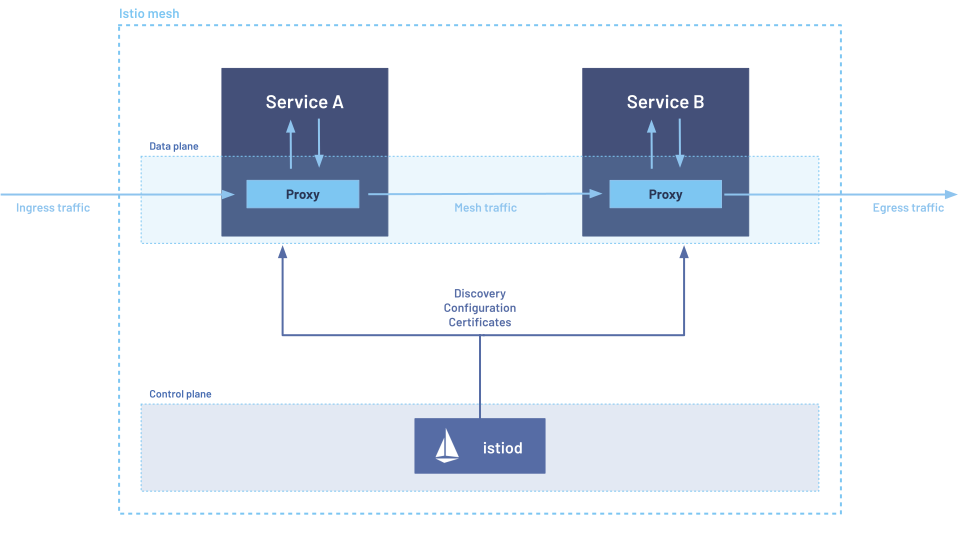
Running thousands of sidecar Envoys is great for performance, but managing their configuration manually is impossible. This is where Istio comes in.
- Envoy is the Data Plane: The fleet of proxies touching every packet, enforcing policies, and collecting telemetry.
- Istio is the Control Plane: The centralized management layer. It doesn’t touch traffic. Instead, Istio computes routing rules and security policies and pushes them down dynamically to the Envoy proxies via their xDS APIs.
Resource Usage (CPU and Memory)
Envoy is lightweight, but its resource utilization depends on its configuration:
- Memory: An empty instance takes ~10-20MB. However, memory footprints scale linearly with the complexity of routes, clusters, and endpoints pushed via the Control Plane.
- CPU: Threading uses a main thread for management and worker threads for handling traffic. CPU usage scales with the number of requests per second (RPS) and the complexity of the filter chain.
- Note on TLS Termination: The cryptographic math for encryption is computationally expensive. High connection churn (repeatedly performing initial TLS handshakes for short-lived connections), older expensive ciphers (like 4096-bit RSA keys), and enforcing full mTLS (encrypting/decrypting traffic in both directions) will drastically increase CPU overhead compared to simply routing plaintext packets.
Show Me The Code
1. Traditional LB vs. Envoy Sidecar
Traditionally, if Service A wants to call Service B, it needs to know the DNS endpoint of Service B’s centralized Load Balancer:
# Traditional approach: Client must know the central LB endpoint
response = requests.get("http://service-b-lb.internal:8080/api/data")
With an Envoy Sidecar, the application simply talks to localhost. Envoy’s configuration maps that local port and handles discovering Service B’s healthy endpoints dynamically:
# Sidecar approach: App talks to localhost, Envoy handles routing and load balancing
response = requests.get("http://localhost:9001/api/data")
Note: In advanced transparent meshes like Istio, iptables rules are configured so the app can use normal DNS names (e.g., http://service-b.namespace) and the network layer silently intercepts and redirects the outbound traffic through the local Envoy sidecar without any code changes!
2. Envoy’s Source Code (C++)
Underneath the declarative YAML configs, Envoy is an event-driven C++ application. Here is a conceptual peek at what its internal C++ source code looks like when handling a new network connection. Note the built-in observability:
// A simplified example of how Envoy might handle accepting a new connection
void ConnectionHandlerImpl::ActiveListener::onAccept(ConnectionSocketPtr&& socket) {
  // Create a new active TCP connection from the accepted socket
  ActiveTcpConnectionPtr active_connection(new ActiveTcpConnection(
      *this, std::move(socket), listener_.dispatcher()));

  // Add the connection to the worker thread's list
  connections_.emplace_back(std::move(active_connection));

  // Automatically increment telemetry statistics
  // This is why Envoy is famous for its built-in observability!
  listener_.stats_.downstream_cx_total_.inc();
  listener_.stats_.downstream_cx_active_.inc();
}